For tournament directors & clubs

Seeded in minutes. Not at 2 a.m.

Registration and payment, pools seeded with a paste, a court schedule that fills itself, score sheets with a QR code on every one, and a public schedule that updates the moment a score is entered — free when spectator tickets run through it.

  • Free with spectator tickets
  • Pools of 3, 4 or 5, brackets of 3 to 8
  • No app for anyone
The Court Grid on a tournament Saturday: six courts across and hourly start times down, the first three rounds played with their set scores and the time each score came in, and the rest still to play, coloured by division.
The real screen · sample tournament
1 pastenumbers a division from a ranked list or a spreadsheet of pools, even with typos in the names
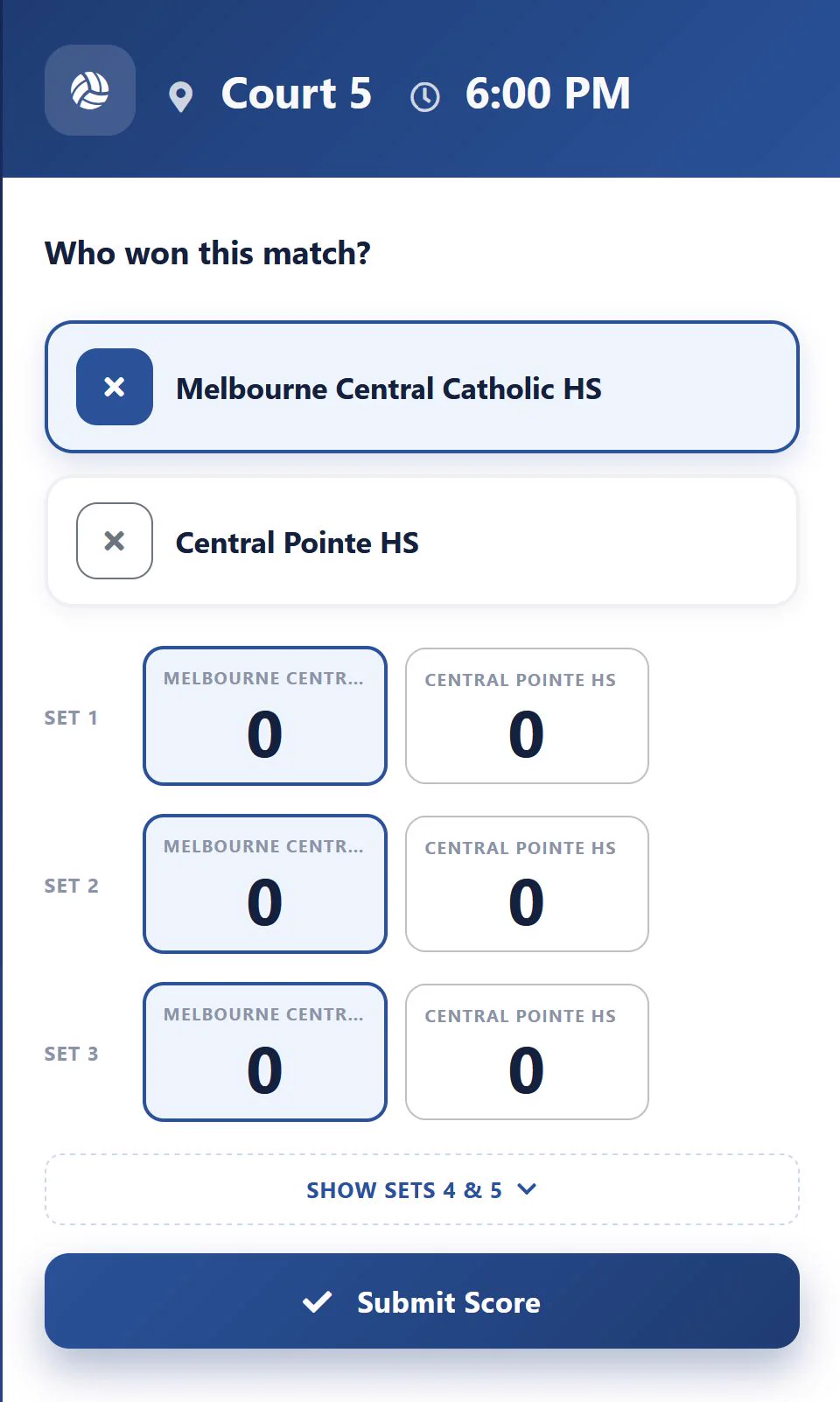
QRon every score sheet: a scorekeeper scans it and enters the result from a phone
Livestandings and brackets for parents, with no account, updated as each score arrives
$0to run the tournament when spectator tickets are sold through it

01How the weekend runs

A tournament shouldn’t be a second job.

Every picture on this page is the real software with a sample tournament in it — the organiser’s screens and the public pages parents read. The demo walks through each one live.

Register Now & Registered Teams

Teams register and pay. You don’t retype anything.

Share one registration link. Clubs pick their age group and division and pay by card, or you add teams in bulk yourself. Every registration lands in one list with its contact, division, payment and balance.

  • Take a card over the phone, or record a check or pay-on-site
  • Send an invoice with a PAY NOW button that pays without signing in
  • Payment reminders to every unpaid team with a balance, in one go
  • Money goes to your own Stripe or Square account
See it in a demo
Registered Teams: each team with its contact, division, pool and seed, payment status, balance and registration time, and buttons to take a card, send an invoice, view the statement or drop the registration.

Day 1 Pool Seeding

Paste your rankings. Get balanced pools.

Number the teams strongest to weakest — or paste a ranked list or a spreadsheet of pools straight in — and Auto-Seed deals them into pools the way a snake draft does, so every pool is even. Preview first; nothing is saved until you apply.

  • Pasted names match teams even when they’re typed differently — Seminole HS finds Seminole High School, Lake Brantly finds Lake Brantley
  • Pools of 3, 4 or 5, with crossovers for pools of 3; it tells you which layouts fit your team count
  • Accept a team to lock it into its pool; swap two teams in one step
See it in a demo
The public schedule: a pool of four with its standings ranked automatically and every match with its court, time, work team and score.

Day 1 Pool Chart

Every pool, every match, every court.

Each pool’s matches take their court and start time from the court schedule you laid out, with the work team on each. As scores come in, match, set and point percentages rebuild themselves; you type the final rank and the crossovers and brackets fill in.

  • Type Match 1’s time and the rest fill in an hour apart
  • A red court box means a match has nowhere to play yet
  • Print that pool’s score sheets from the same screen
See it in a demo
A pool of four: standings with matches and sets won and lost and match, set and point percentages, and six matches with time, day, court, the work team and set scores for the three already played.

Score Sheets & score entry

Print the sheets. Scan to score.

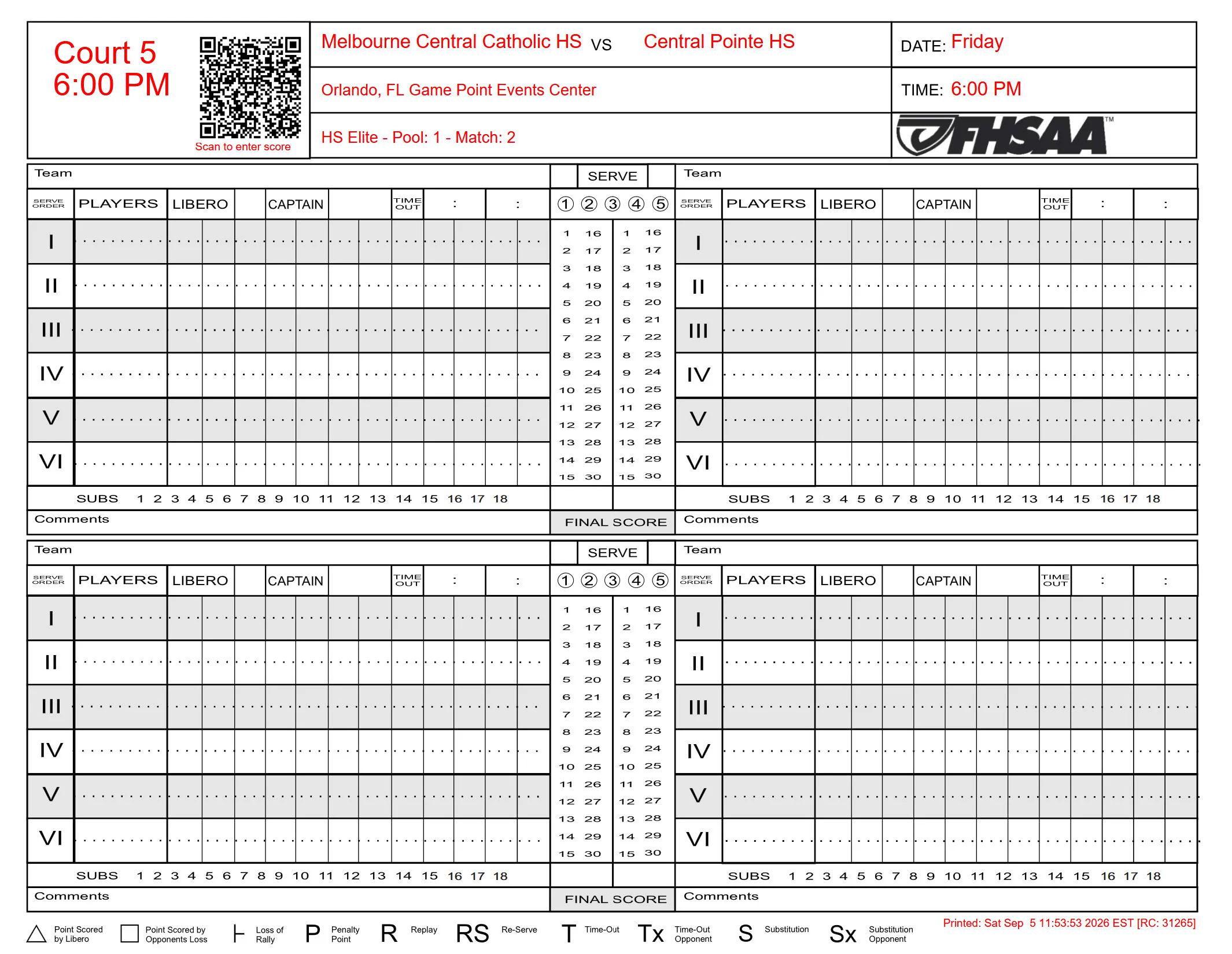
USAV / AAU, NFHS or FHSAA score sheets, printed for the whole tournament, a division, a pool, a court or a start time. Every sheet carries a QR code: the scorekeeper scans it, taps the winner, enters the sets, and the standings move.

  • An access key per event, so only your scorekeepers can submit
  • The page checks the sets agree with the winner before it saves
  • In a bracket, submitting the score advances the winner
  • Whoops! Fix Score reopens a match that was entered wrong
See it in a demo
A printed volleyball score sheet for one match, with the teams, court and time filled in and a QR code that opens the match's score entry page.

Day 2 Brackets

Pool play to Gold, Silver and Bronze.

Size each division’s Gold, Silver, Bronze, Copper and Flight brackets, then seed them from how teams finished their pools — drag a card onto a seed, or let it drop where its pool finish puts it. Brackets of 3 to 8 teams, with a consolation match if you want one.

  • Wrong Spot warns when a team is placed against its pool finish
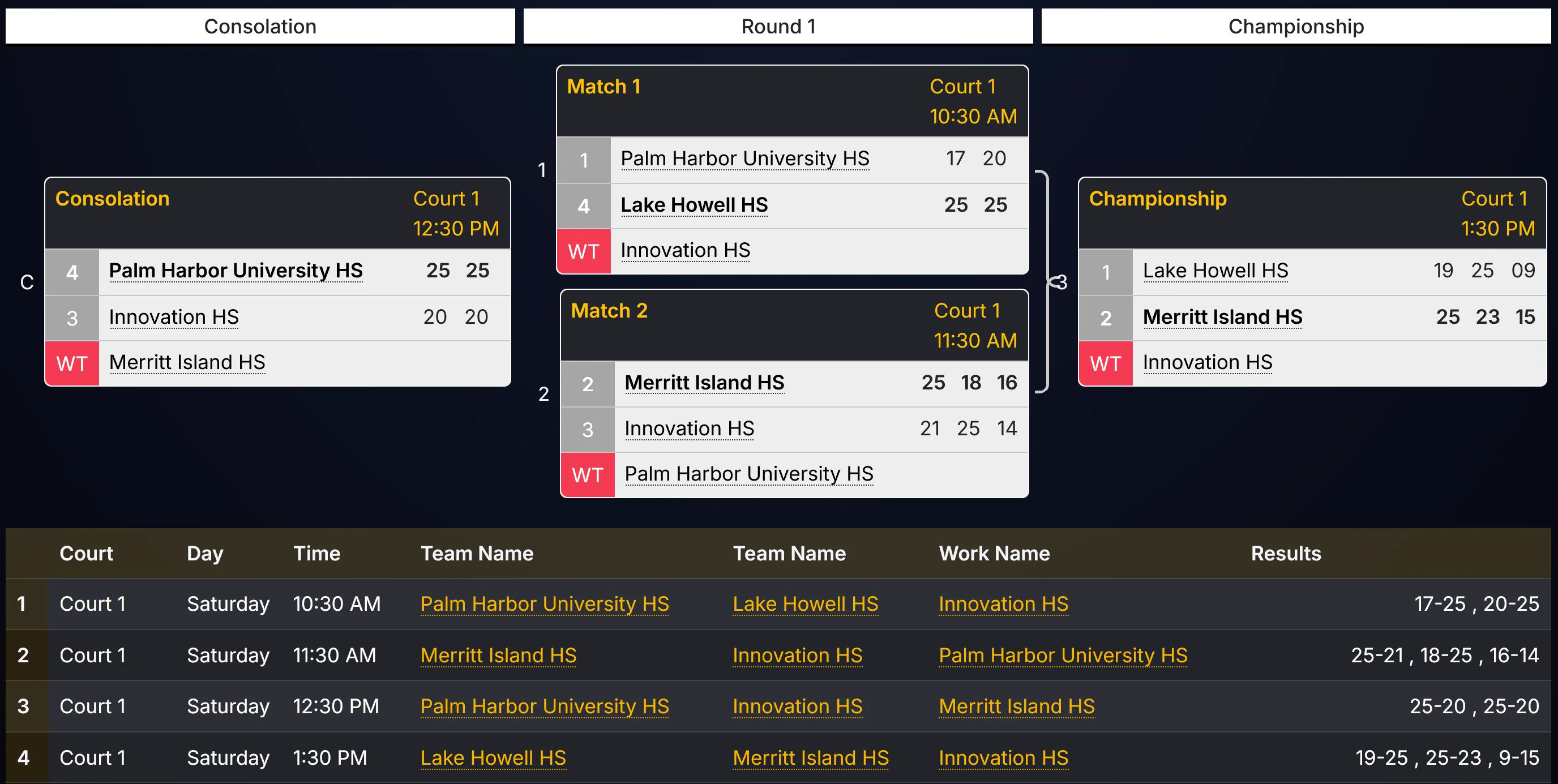
  • Winners advance themselves as scores are submitted
  • Final Standings ranks every team across every bracket, ready to print
See it in a demo
The public schedule: a four-team bracket with its matches, scores and the team advancing.

The public schedule

The page every parent refreshes.

Pools, standings, brackets and each team’s own schedule are public pages. Nobody needs an account to read them, and they change the moment a score is entered at the table — so the question at the head table becomes “where do we play next?” answered on a phone.

  • Your event’s own images, and a court-location header on every pool
  • A QR poster that opens the schedule, for the gym wall
  • Spectator tickets sold on the same page — see Tickets
See it in a demo
The public schedule page for the Lake Howell Invitational: the event's own poster, with Division, Court and Team pickers across the top and the Team list open, every team shown with its division.

Court Grid

The whole building on one screen.

Every court across, every start time down, every match coloured by division. Switch to Progress and played matches grey out with their scores and the time each came in; a bar under each court says how far ahead or behind it is running. With an assignor crewing the event, the Officials view shows the first and second referee on every match.

The Court Grid in Progress view across six courts.

02Officials

Crew it on the same platform.

Hand your assignor a connection code and they pull the tournament into their own assigning tool — divisions, courts, teams and every match — and crew it there. They see the schedule and nothing else: no registrations, no money.

  • Release tournaments one at a time, withhold one, or revoke the code
  • First and second referee on every match of your Court Grid
  • Alerts for matches with no first referee, and officials due on another court too soon
How assignors crew it

NewLeague Scheduling

A whole season, built in one go.

Run a league of one-day weekends that ends in a playoff day. Add Event makes every weekend at once, Build the season draws every weekend’s pools up front — rotated so teams meet new opponents — and the standings add up each division’s results as the scores come in.

  • Teams register for the whole league, or for any single weekend
  • The playoff day’s Gold, Silver and Bronze brackets seed themselves from the league standings
  • Add, move or remove a weekend mid-season; a rained-out day’s tickets move with it
  • One spectator ticket event: a league pass for every day, or a day pass for one
See it in a demo

03How it works

From event page to final bracket.

Four stages, each on its own screen, in the order you already run them.

  1. Build your event

    Add Event walks you through it card by card: name, age groups, divisions, team limits, price, images, location and dates. Lay out the courts and waves on the court schedule.

  2. Open registration

    Publish the divisions and share the link. Teams register and pay; you chase balances with one button.

  3. Seed & run

    Auto-Seed the pools, print the score sheets, and let scorekeepers scan and submit. Watch the Court Grid.

  4. Go live

    Brackets seed from pool finishes, winners advance as scores come in, and Final Standings are ready when the last match ends.

04Pricing

Free to run. Tickets pay for it.

No tournament is too small — whether you are running one court or twenty, a three-team pool or a 128-team weekend.

Tournament management

Freewith tickets

Sell spectator tickets through iPLEXsports and the whole tournament platform costs nothing.

  • Custom event website and team registration
  • Automated pool and bracket seeding
  • Court grid, score sheets and QR scoring
  • Live public schedule and results
Book a demo

Spectator tickets

50¢a QR ticket

No monthly fee, no setup fee and no minimum.

  • Whole-event and single-day passes
  • QR code check-in at the door
  • Funds paid into your own account
  • Unlocks free tournament management
About tickets

Selling tickets somewhere else? Standalone tournament pricing is available — book a demo and we will work out what fits your event.

05Questions

What directors ask first.

Anything not here is a good question for the demo.

What sports does it support?

It is built around volleyball, junior club and high school, and suits any tournament that runs pool play into bracket play. Bring your format to the demo and we will tell you straight whether it fits.

How many teams or divisions can I run?

From a three-team pool at the local rec center to a 128-team, two-day weekend, on the same platform. Pools of three, four or five, brackets of four to eight, and age groups from U10 to U18 in the same event, with crossovers and Gold, Silver, Bronze, Copper and Flight brackets part of the format.

Do officials need to install an app?

No. Officials open a link in any phone browser to see their court and submit results.

Can I sell tickets to spectators?

Yes. Whole-event and single-day passes are sold on the event’s own page, a QR code is scanned at the door, and the money is paid into your own Stripe or Square account. It is also what makes the tournament side free.

Can parents see the schedule without signing in?

Yes. Pools, standings, brackets and each team’s own schedule are public pages. Nobody needs an account to read them, and they update the moment a score is entered at the table.

We already have a registration provider. Can we still use this?

Yes. The tournament side does not require you to move registration. Teams can be imported in bulk, and everything downstream of that (pools, courts, brackets, sheets, schedules) works the same way.

How do I get started?

Create a free account — or book a 20-minute demo. We walk through your format, show your divisions running, and get your first event page set up.

→Book a demo

Twenty minutes. Your draw. No slides.

  1. Bring your format

    Divisions, pool sizes, courts and wave times — however your event actually runs.

  2. See your weekend built

    Pools seeded, the court grid filled, a score sheet printed and the public schedule parents will read.

  3. Get a straight answer

    If it is not a fit for how you run, we will tell you in the same call.

Pick a time that suits you

Book a demo

Choose a day and time on the next page — it takes about a minute. One conversation, no obligation.

Book a 20-minute demo